
Best Sensitivity for Free Fire – Best Settings for Headshots
Wrong sensitivity is the silent killer of headshots. You can have great game sense, know every rotation, pick the perfect character but if your sensitivity is off, your aim will always feel one step behind.
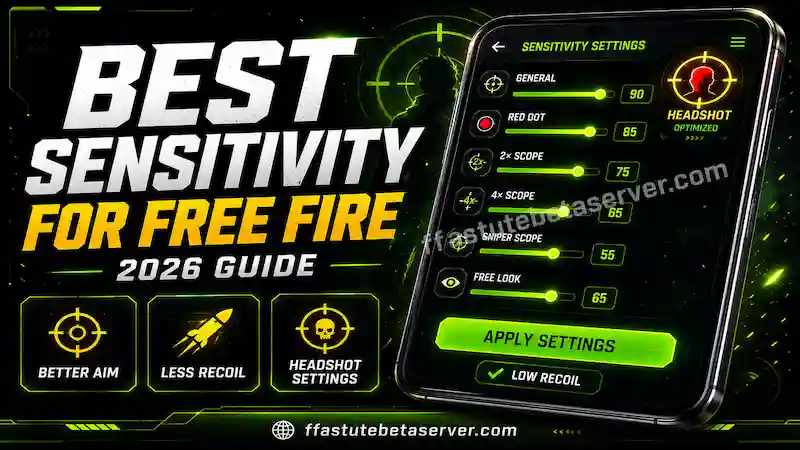
The best sensitivity for Free Fire is not one fixed number. It depends on your device, your screen size, your grip style, and even how long you have been playing. A setting that feels perfect on a Samsung S24 Ultra will feel completely uncontrollable on a Redmi 9.
This tool generates the best FF sensitivity settings for your specific device type. Pick your tier below, get your values, and start testing in Training Mode today.
Adjust Your Sensitivity – Tool
FF Sensitivity Tool
Find Your Best Sensitivity
Select your device type to get optimized settings
Use Training Mode for 20 minutes after applying. Adjust ±5 until aim feels natural.
Back to home page and try other tools for best performance
→ Check Your Headshot Rate –
→ Fix Device Lag
→ Back to All Tools
→ Download Astute Beta Server
Best Sensitivity for Free Fire – Device-Based Settings
Most players copy sensitivity numbers from YouTube. The creator is using a flagship gaming phone. You are on a budget Android. Their numbers feel wrong on your device — and they always will.
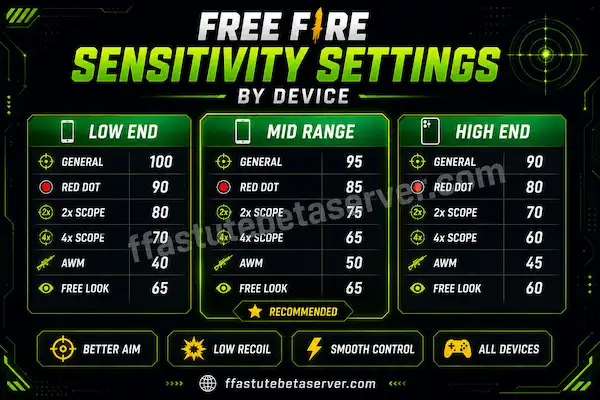
Here are the recommended starting values by device type:
| Setting | Low End (2GB) | Mid Range (3-5GB) | High End (6GB+) |
|---|---|---|---|
| General | 90–100 | 95–105 | 100–115 |
| Red Dot | 85–92 | 88–98 | 92–105 |
| 2x Scope | 75–82 | 78–88 | 82–92 |
| 4x Scope | 62–70 | 65–75 | 68–78 |
| AWM Scope | 48–56 | 52–60 | 55–65 |
| Free Look | 60–68 | 63–72 | 68–80 |
How to find your device tier: → 2GB RAM or less = Low End (Tecno Spark, Redmi 9, Infinix Hot) → 3GB to 5GB RAM = Mid Range (Samsung A series, Redmi Note series) → 6GB RAM and above = High End (OnePlus, Samsung S series, ROG Phone)
Not sure about your RAM? Open Settings → About Phone → RAM.
Use these as your starting point — not your final answer. Your aim will feel worse before it feels better because your muscle memory needs 20-30 matches to adjust.
What is the best sensitivity for Free Fire on a budget phone?
If you have 2GB RAM, start with General 90-95, Red Dot 85-90, 2x Scope 75-80. Lower end of the ranges above. Budget phones have smaller screens and touch input that responds differently from flagship devices.
Free Fire Sensitivity Settings
All 6 Categories Explained
Most players only think about General sensitivity and ignore the rest. That single mistake costs them headshots every match.
FF sensitivity settings have six separate categories. Each controls a completely different type of aim movement.
General sensitivity is your baseline. It controls how fast your view moves when you swipe without aiming. Too high and every accidental touch throws your whole view off completely.
Red Dot sensitivity controls movement when using the red dot sight in close-range fights. This should be 5-10 points lower than your General setting. The slight reduction gives you precision control exactly when you need headshots most.
2x Scope sensitivity is for medium range engagements. Lower than Red Dot. You need more control to track targets at this distance without overshooting constantly.
4x Scope sensitivity is for long-range combat. Set it lower than 2x. Even a tiny twitch at long range moves the crosshair way past the target. Slower is more accurate here.
AWM Scope sensitivity is your absolute lowest setting. Sniping requires one-shot precision. Twitchy AWM sensitivity wastes your most powerful shots on missed opportunities.
Free Look sensitivity controls looking around without moving your character. Personal preference some players like it fast to scan surroundings quickly. Others prefer slow to avoid accidental camera movement during tense moments.
Why should Red Dot sensitivity be lower than General?
Because close-range headshots require micro-adjustments. If Red Dot matches or exceeds your General setting, your crosshair overshoots the head zone too fast to correct. Dropping Red Dot by 5-8 points from General gives you just enough slowdown to land the shot precisely.
Free Fire Headshot Sensitivity – The Exact Adjustments
Free fire headshot sensitivity is about more than just numbers. It is the combination of the right values plus the right habit.
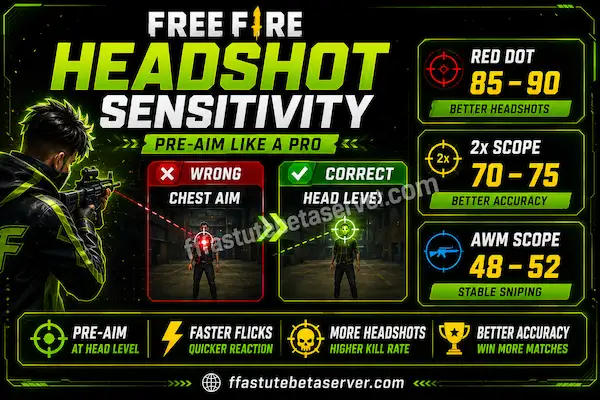
The habit is called pre-aiming. Instead of bringing your crosshair UP when a fight starts, you keep it ALREADY at head height as you move. When an enemy appears, minimal adjustment is needed and your headshot sensitivity helps you make that tiny correction accurately.
The two settings that affect headshot rate most directly are Red Dot and 2x Scope. Here is what to adjust:
If you consistently overshoot heads in close range:
→ Lower your Red Dot sensitivity by 5 points
→ Test for 15 matches in Training Mode
→ Most players see instant improvement in headshot rate
If you consistently overshoot at medium range:
→ Lower your 2x Scope sensitivity by 5 points
→ Practice burst shooting fire 2-3 shots, re-aim, repeat
→ The pause between bursts compensates for tracking overshoot
If you miss headshots at long range with snipers:
→ Your AWM Scope sensitivity may be too high
→ Drop it to 48-52 and practice stationary target shots first
→ Moving target sniping needs lower sensitivity than most think
Does free fire headshot sensitivity change between Free Fire and Free Fire MAX?
Not the numbers — both versions use identical sensitivity mechanics. But Free Fire MAX runs heavier graphics on most devices. On mid-range phones, this can make aim feel slightly different at the same settings. If MAX feels less responsive, lower each setting by 3-5 points and retest.
Free Fire Best Sensitivity
Why Most Players Get It Wrong
The best sensitivity is not whatever a pro player or YouTuber is using. That is the biggest misconception in the entire Free Fire community.
Pro players use settings optimized for their specific phone, their years of muscle memory, and their individual playstyle. Applying their exact numbers to your budget Android gives you numbers that feel completely wrong not because the numbers are bad, but because they were never made for you.
The second mistake is changing sensitivity after every bad match. When you play badly, it feels like something must be wrong with your settings. Usually the settings are fine. The problem is game sense, positioning, or the wrong weapon choice for the situation. Changing sensitivity while frustrated adds more variables to an already-confused aim.
The third mistake is never adjusting at all. If you bought a new phone, your old settings need recalibration. Different screen sizes, different touch response, different RAM all of these change what feels right.
Give any new sensitivity 20-30 matches before judging it. Your aim gets worse before it gets better. That is normal. It means your muscle memory is rewiring itself not that the settings are wrong.
How to Test and Fine-Tune Your Settings
Once you have your starting values from the tool above, here is exactly how to refine them for your personal best sensitivity.
Step 1:
Apply your device tier values exactly as shown. Do not adjust anything yet. Use them raw first.
Step 2:
Go to Training Mode immediately. Never test new sensitivity in a ranked match. Training Mode gives you unlimited shots and moving targets to practice with.
Step 3:
Spend 20 minutes on headshots only. Stand at various distances from training targets. Try to hit only the head. Notice if you overshoot left, right, or low.
Step 4:
Make one adjustment at a time. If you overshoot consistently, lower that specific setting by 5. If you undershoot consistently, raise it by 5. One change at a time. Multiple simultaneous changes make it impossible to know what helped.
Step 5:
Use 10 ranked matches to confirm. After Training Mode adjustments, play 10 ranked matches. Track if your aim problems decreased. If yes, keep the change. If no improvement, revert to the previous value.
How long should I stick with new sensitivity before changing?
At minimum 20 matches. Preferably 30. Your first 5-10 matches with new settings will almost always feel wrong because your finger muscle memory still expects the old response. The improvement shows up after 15-20 matches when your body adapts.
Best Sensitivity for Free Fire MAX
Free fire best sensitivity for MAX is slightly different than for the standard version on most devices.
Free Fire MAX runs enhanced textures, better lighting effects, and smoother animations. This adds processing load. On a mid-range phone, that extra load can make the game feel slightly different especially during fast movement in fights.
Rule of thumb for Free Fire MAX sensitivity:
→ High-end device (6GB+ RAM): use the same settings as standard
→ Mid-range device (3-5GB RAM): use Low End values from the table
→ Low-end device (2GB RAM): Free Fire MAX may not run smoothly
The reason: on mid-range devices, MAX’s animations are smoother but frame rate is lower. Slightly lower sensitivity compensates for this difference in feel.
Should I use the same sensitivity in ranked and casual matches?
Yes. Switching between different sensitivity settings for different modes confuses your muscle memory and slows improvement. Pick one set of values and use them everywhere consistently.
Benefits of Proper Sensitivity
- Better aim control
- Improved headshot accuracy
- Faster reaction time
- Smooth gameplay experience
Common Mistakes
- Using very high sensitivity
- Not testing settings properly
- Ignoring device performance