Free Fire OBB File Download
APK + OBB Complete Guide 2026
Quick Answer:
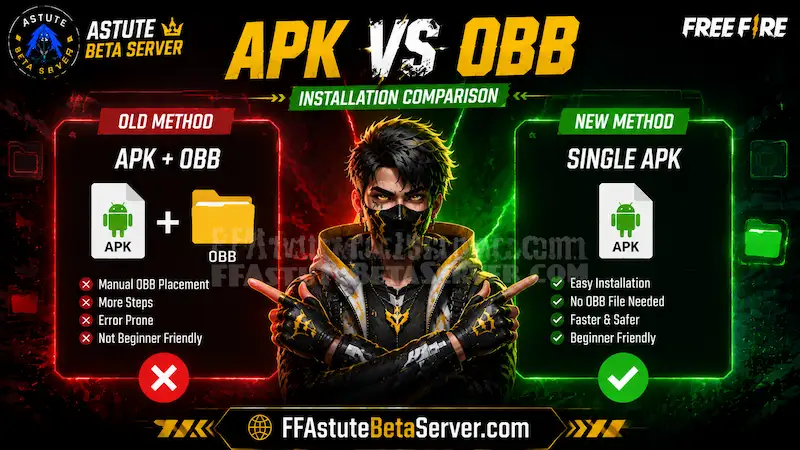
No. The latest Free Fire OB54 and Free Fire MAX versions no longer require a separate OBB file. Everything is included in the APK or installation package. If you’re looking for installation help, follow our updated Astute Beta Server guides instead of downloading outdated OBB files.
Players searching for a Free Fire OBB file download usually hit one of two situations. Either they read an old guide that mentioned OBB files and followed it here, or they are getting an installation error and someone in a forum told them they need an OBB file to fix it.
This guide gives you the complete, accurate answer — what OBB files actually are, whether Free Fire OB54 needs one, how Free Fire MAX OBB works, and what to do if your installation is failing.
Astute Beta Server APK Download
Free Fire OBB File — What Is It?
OBB stands for Opaque Binary Blob. It is an Android expansion file format designed for large apps and games that exceed the standard APK size limit on older Play Store infrastructure.
When games used the OBB format, installation had two parts. First you installed the APK the core app. Then you placed the OBB data file in a specific folder on your device storage, usually Android/obb/com.dts.freefireth/ for Free Fire
or Android/obb/com.dts.freefiremax/ for Free Fire MAX.
If the OBB file went in the wrong folder, the game failed to start even after a successful APK install.
This two-step process caused enormous confusion. Players would install the APK correctly but place the OBB in the wrong directory and spend hours troubleshooting what looked like a broken installation.
Free Fire OBB File Download
Does OB54 Need One?
No. Free Fire OB54 does not require a separate OBB file download.
Garena transitioned away from the split APK plus OBB format in previous update cycles. The current Free Fire installation is a single self-contained package. All game data, assets, and code are bundled together. You download one file, install it, and launch.
If a site is offering you a “Free Fire OBB file download” specifically for OB54, that site is either providing outdated information or distributing files you do not need.
Free Fire MAX OBB File Download — Same Answer
Free Fire MAX also does not require a separate OBB file in the latest versions.
The current Free Fire MAX release is distributed as a complete installation package, so players no longer need to manually copy OBB files into Android folders. Everything required to run the game is included during installation.
If you’re downloading the game outside the Google Play Store, always use a trusted source. Our website provides detailed installation tutorials that explain how to safely install the latest Free Fire and Astute Beta Server APK versions without manually handling OBB files.
For the latest installation instructions, you can also read:
FF APK OBB Package Names for Developers and Advanced Users
For players who genuinely need the OBB directory paths for older Free Fire versions or development purposes:
| Game | Package Name | OBB Directory |
|---|---|---|
| Free Fire | com.dts.freefireth | Android/obb/com.dts.freefireth/ |
| Free Fire MAX | com.dts.freefiremax | Android/obb/com.dts.freefiremax/ |
The Android package name android obb com dts freefireth is Free Fire’s system identifier. com dts freefiremax obb is Free Fire MAX’s equivalent. These paths only matter if you are working with older APK versions that still used the split package format.
Astute Beta OBB
Does Astute Beta Server Need an OBB File?
No. The Astute Beta Server APK is a single self-contained file with no separate OBB required.
Download the APK from our download page. Enable Unknown Sources in Android settings. Tap the file and install. Launch using Guest Mode. The entire beta environment is inside that one APK — no OBB folder placement, no secondary download.
Players searching for “astute beta obb” are usually troubleshooting an installation error. In nearly every case, the actual problem is one of the issues listed in the troubleshooting section below — not a missing OBB file.
Free Fire OBB File Download Highly Compressed
Is This Safe?
Sites offering “Free Fire OBB file download highly compressed” versions are a red flag.
Legitimate game files from Garena are not compressed in ways that require a special decompressor. If a site is offering a “highly compressed” OBB file, they have either repackaged Garena’s files themselves — which is redistribution without authorization — or they have added something to the package. Neither is safe.
Garena does not distribute highly compressed versions of game files. The only safe sources for Free Fire files are the Google Play Store, Galaxy Store, Apple App Store, and established APK mirrors like ffastutebetaserver.com that verify file signatures against the Play Store release.
Free Fire APK and OBB File Download
Installation Troubleshooting
If your Free Fire installation is failing and someone told you to get an OBB file, here are the actual fixes:
Not enough storage
Free Fire requires approximately 2.5 GB free. Free Fire MAX needs around 3 GB. Check your available storage before installing. If it’s under the requirement, clear space first.
Unknown Sources not enabled
Required for APK installs outside the Play Store. Android 7 and below:
Settings → Security → Unknown Sources → On. Android 8 and above: Settings → Apps → Special App Access → Install Unknown Apps → Enable for your browser or file manager.
Old version conflict
If a previous Free Fire installation exists, leftover files can conflict with the new APK. Uninstall completely, restart your device, then install the new APK fresh.
Wrong Android version
Free Fire requires Android 5.0 or above. Free Fire MAX requires Android 5.0 or above but performs better on Android 8 and above. Devices running Android 4.x cannot install current versions.
Free Fire APK OBB for Android — Version History Context
Free Fire used the APK plus OBB format during earlier version cycles when the game size exceeded Play Store’s APK-only limit. Players from that era remember the two-file installation process. Many older YouTube tutorials and blog posts still describe this process, which is why OBB-related searches remain high despite current versions not needing it.
The table below shows how installation changed:
| Era | Format | OBB Required |
|---|---|---|
| Free Fire 2018-2020 | APK + OBB | Yes |
| Free Fire 2021-2022 | APK + OBB (some builds) | Sometimes |
| Free Fire 2023-present | Single APK / XAPK | No |
| Free Fire OB54 (2026 9th Anniversary update) | Single APK | No |
| Free Fire OB55 (Aug-sep) | single APK | No |
| Astute Beta Server | Single APK | No |