
Free Fire Proxy Server — Fix High Ping, Reduce Lag & Boost Connection 2026
High ping in Free Fire is not just frustrating — it costs you fights you mechanically won. You shoot first, the kill doesn’t register. You dodge, the damage still lands. The server is working with information that’s 200 milliseconds behind your actual position.
A Free Fire proxy server fixes this by changing the path your connection takes to reach Garena’s servers.
This guide covers what a proxy server actually does, and how to unlock beta server, which players benefit most. The manual Android setup steps for every version, and the best free options available in 2026.
What Is a Free Fire Proxy Server?
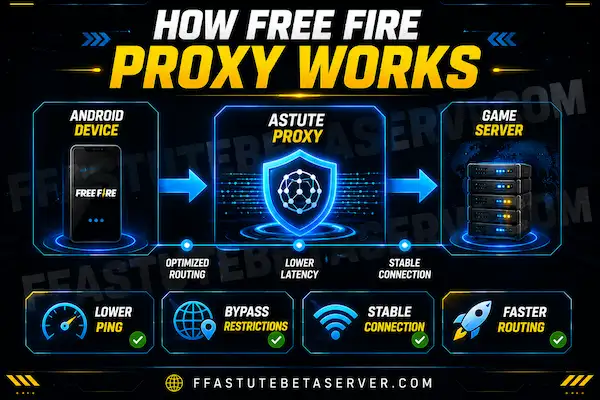
A proxy server sits between your device and Garena’s game server. Instead of your connection traveling directly from your phone to Singapore — where Garena’s main servers are located. It routes through a relay point that has a faster, more direct path to those servers.
Think of it like a road system. The direct route from Pakistan or India to Singapore goes through congested internet infrastructure with multiple handoff points. The proxy route uses a less congested, more optimized path that gets there faster even though it technically makes an extra stop.
The result is lower ping, fewer packet drops, and more stable connection during peak hours.
Why Do Players in Pakistan and India Need a Proxy Server?
Garena’s primary Free Fire infrastructure runs out of Singapore. The physical distance from South Asia to Singapore is significant — but physical distance is only part of the problem.
The bigger issue is ISP routing. Mobile networks in Pakistan (Zong, Jazz, Ufone, Telenor) and India (Jio, Airtel, Vi) often route international traffic through congested exchange points. This adds latency that has nothing to do with your actual distance from the server.
Typical ping without proxy for Pakistani players on 4G mobile data: 140ms to 200ms.
Typical ping with an optimized proxy setup: 60ms to 100ms.
The improvement is real and consistent not just during off-peak hours but throughout the day.
→ Fix Device Lag
→ Check Free Fire Ping Test Tool
→ Back to All Tools
| Country | Common Problem | Expected Improvement |
|---|---|---|
| Pakistan | ISP routing congestion on Zong/Jazz | 40-60% ping reduction |
| India | Jio/Airtel peak hour instability | 30-50% ping reduction |
| Bangladesh | Regional routing inefficiency | Significant improvement |
| Indonesia | ISP inconsistency | Moderate improvement |
| Vietnam | High base ping to Singapore | 20-40% reduction |
| Middle East | Geographic distance | Node-dependent |
Free Fire Proxy Server Setup for Android — Step by Step
Manual proxy configuration works differently on each Android version. Follow the section for your specific version.
Android 5, 6, and 7:
Settings → Wi-Fi → Long press your connected network name → Modify Network → Show Advanced Options → Proxy → Manual → Enter hostname and port → Save → Reconnect to Wi-Fi
Android 8 and 9:
Settings → Wi-Fi → Tap your connected network → Advanced → Proxy → Manual → Enter hostname and port → Save
Android 10 and 11:
Settings → Wi-Fi → Tap the settings gear icon next to your network → Advanced → Proxy → Manual → Enter hostname and port → Save
Android 12 and above:
Settings → Network & Internet → Wi-Fi → Tap your connected network → Edit (pencil icon) → Advanced options → Proxy → Manual → Enter hostname and port → Save
For Mobile Data (all Android versions):
Settings → Connections → Mobile Networks → Access Point Names → Tap your current APN → Find the Proxy field → Enter hostname → Save → Toggle mobile data off and on to apply
Download free fire ob53 and explore latest features of free fire ob54
How Proxy Server Works
Understanding how the proxy works helps you get the maximum benefit from it.
When you open Astute Beta Server, the built-in proxy server automatically analyzes your location and selects the fastest available routing path to Garena’s servers.
Your connection travels:
Your Device → Astute Proxy Nodes → Optimized Path → Garena Servers
This smart routing achieves three things simultaneously:
— Lower Ping
By routing through optimized nodes geographically positioned closer to Garena’s infrastructure, the total distance your data travels is reduced. Lower travel distance means lower ping — often dramatically.
— More Stable Connection
Standard ISP routing can be inconsistent during peak hours. The proxy uses dedicated, optimized pathways that maintain consistent throughput — meaning fewer lag spikes and dropped packets during critical gameplay moments.
VIP Proxy Server for Free Fire — What Is It?
A VIP proxy server for Free Fire refers to premium-grade proxy routing using high-performance dedicated server infrastructure. Most standalone VIP proxy services charge a monthly subscription for this level of access.
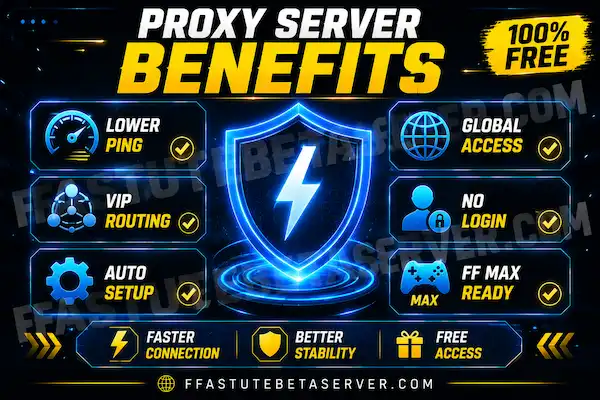
Astute Beta Server includes VIP quality routing at zero cost — completely free, built directly into the platform.
The VIP server experience you get includes:
Dedicated routing nodes
not shared with unrelated traffic
Smart server selection
automatically chooses fastest path
Consistent low-ping routing
even during peak gaming hours
Beta content access
proxy unlocks regional restrictions
Free Fire MAX enhanced routing
optimized for higher graphics
This is why players searching for Free Fire consistently arrive at Astute Beta Server — it delivers premium proxy quality at zero cost.
What Proxy Hostname and Port to Use for Free Fire
For gaming proxy specifically, you need a server with a node geographically between your location and Singapore. General purpose proxy servers often make ping worse, not better — they are not optimized for gaming traffic.
Recommended approach for South Asian players:
Gaming VPNs with Singapore servers work better than generic proxy configurations for Free Fire specifically.
– ProtonVPN free tier has Singapore nodes.
– Windscribe free tier includes Singapore.
– Cloudflare WARP (1.1.1.1 app) is completely free, uses Cloudflare’s optimized global network, and consistently reduces ping for players in Pakistan and India without any manual proxy hostname configuration.
How to set up Cloudflare WARP for Free Fire:
Download the 1.1.1.1 app from Play Store → Toggle WARP on → Open Free Fire → Check ping in the game’s server settings.
This is the simplest and most effective free solution for most South Asian players.
Free Fire Proxy Server vs VPN — Which Is Better?
Many players ask whether to use a proxy or a VPN for Free Fire ping reduction. The practical difference for gaming:
| Feature | Manual Proxy | Gaming VPN |
|---|---|---|
| Setup difficulty | Medium — manual config | Easy — one toggle |
| Ping improvement | Good if configured correctly | Excellent with gaming server |
| Connection stability | Depends on proxy quality | Generally more stable |
| Cost | Free | Free tier available |
| Covers all apps | No — Wi-Fi only | Yes — device-wide |
| Risk of making ping worse | Yes if wrong server | Lower with gaming-optimized VPN |
For most players, a gaming-optimized VPN with a Singapore server outperforms manual proxy configuration. The manual proxy method works well when you have a specific hostname from a service you trust, but choosing the wrong proxy server can increase ping rather than reduce it.
How to Get Free Fire Proxy Server — Step by Step
Getting the best solution takes under five minutes. IOS user visit detail guide.
Install the APK
Enable Unknown Sources in Settings → Security → Install
Unknown Apps. Open Downloads, tap the file, press Install.
Takes under sixty seconds.
Open and Select Guest Account
Launch the app. Choose Guest Account. Your main Garena
profile stays completely safe.
Proxy Activates Automatically
The moment the app opens, the built-in proxy server starts
working in the background. Lower ping. Faster connection.
Regional access unlocked. All automatic. All free.
Proxy Server vs Third-Party Apps
Many players try standalone proxy and VPN apps before discovering the better built-in option. Here is how they compare.
| Feature | Astute Beta Server | Third-Party Proxy Apps |
| Cost | Free ✅ | Paid subscription ❌ |
| Setup | Automatic ✅ | Manual configuration ❌ |
| Free Fire optimized | Yes ✅ | Generic routing ❌ |
| Beta content access | Yes ✅ | No ❌ |
| Account safety | Guest Account ✅ | No protection ❌ |
| OB content unlock | Yes ✅ | No ❌ |
| Android support | Full ✅ | Varies ❌ |
The choice is clear. A dedicated proxy server built specifically for Garena’s infrastructure outperforms generic proxy apps — and costs absolutely nothing.
Free Fire Proxy Server for Astute Beta Server
During beta server testing phases, connection quality matters even more than during normal gameplay. Beta servers handle significantly more load than production servers because all testers connect simultaneously — this amplifies any underlying connection issues you have.
If you experience connection errors during Astute Beta Server sessions, try these in order:
First — enable the built-in proxy option inside the Astute Beta Server app settings if available. Toggle Proxy Support ON.
Second — if that doesn’t resolve it, enable Cloudflare WARP on your device before launching.
Third — switch from mobile data to Wi-Fi if possible. Beta server connections are significantly more stable on home Wi-Fi than 4G/5G mobile data for most South Asian players.
Why Use Astute Beta Server as Your Free Fire Proxy?
Astute Beta Server is not just a proxy tool. It is the complete Free Fire beta platform — and the proxy is just one of its powerful built-in features.
When you use Astute Beta Server as your proxy server solution, you simultaneously get:
✅ Lower ping and reduced lag (proxy benefit)
✅ Early access to upcoming OB54 content (beta benefit)
✅ New characters, weapons, maps before global release
✅ Exclusive Evo guns and cosmetics — free
✅ Developer feedback system — shape future updates
✅ Free Fire and Free Fire MAX support — both versions
One APK. One install. All of these benefits. Completely free.
Free Fire Ping Test — Check Before You Fix
Before setting up any proxy, run a baseline ping test. This tells you whether the problem is actually your connection routing or something else — device performance, game settings, or server-side issues.
Test your Free Fire ping using our [Free Fire Ping Test Tool] — it checks your current connection quality and tells you whether a proxy is likely to help.
If your baseline ping is under 80ms, a proxy probably won’t make a meaningful difference. If it’s consistently above 120ms, proxy optimization will genuinely improve your experience.
Common Proxy Server Mistakes to Avoid
Using a proxy server in the wrong country. A proxy server in Europe makes ping worse for South Asian players, not better. Always use a server physically closer to Singapore — India, Singapore itself, or Southeast Asia.
Using the same proxy for both gaming and downloads. Shared proxy bandwidth causes inconsistency during matches. If you use a proxy, use it specifically during gaming sessions rather than leaving it on all day.
Assuming proxy fixes all lag. Proxy fixes network routing lag. It does not fix frame rate drops from device overheating, lag from low RAM, or FPS drops from settings being too high for your device. If you experience lag even after ping improvement, use our [Free Fire Lag Fix Tool] to optimize device settings separately.
Changing proxy settings during an active match. Apply proxy settings before launching the game. Changing network settings while in a match causes disconnection.
Free Fire Max Proxy Server
Free Fire MAX requires more bandwidth than standard Free Fire due to enhanced graphics and effects. The same proxy optimization applies — routing through a closer node reduces the bandwidth demand on your main connection.
Players running Free Fire MAX on mid-range devices in Pakistan and India particularly benefit from proxy optimization because it reduces not just ping but also the frequency of connection-related texture loading delays in new map areas.
Both Free Fire and Free Fire MAX respond identically to proxy and VPN routing improvements. Configure once, benefits apply to both.
Frequently Asked Questions — (FAQs)
CONCLUSION
The best Free Fire proxy server in 2026 is already waiting for you inside Astute Beta Server — built-in, free, automatic, and specifically optimized for Garena’s infrastructure.
Lower ping. Faster speeds. Bypassed restrictions. Beta content access. Free Fire MAX support. All in one free APK download.
No separate proxy app needed. No subscription. No configuration. Just download, install, and enjoy a faster Free Fire experience starting right now.
→ What is Astute Beta Server — Full Guide.
→ Free Fire Gaming Tools
→ How to install astute beta server — Full Guide
→ Latest guide and update
Page Updated: 2026 | Free Fire Proxy | Always Free